

Restore Old Photos"Sticky Tape Problems"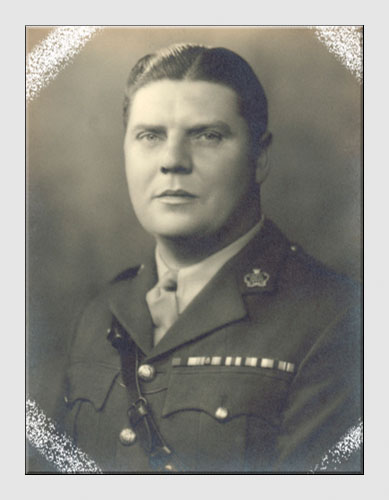 Question from Paul when trying to restore old photos - I am trying to restore a badly damaged b&w picture (Sticky tape has removed the surface) using Elements 6. As I am new to this can you tell me why when I am 'cloning' the area is lighter than intended (from the cloned area). Also the damage goes up the side of the print - how do I keep a straight edge to the print as each time I use the brush it goes over the edge of where I want it. I hope this is not too simple but as I said I am new to this and it is frustrating me!!! I have just found your site and think it is really good. Regards, Paul Answer - Hello Paul,Thanks for contacting me. "when I am 'cloning' the area is lighter than intended (from the cloned area)" Check that the "Opacity" on the tool bar is set to 100%. "how do I keep a straight edge to the print as each time I use the brush it goes over the edge of where I want it" I'm not quite sure what you mean here but you might try creating a new layer on top of the Background image (Layer/New on the tool bar). Brush on this layer the area you want covered then use the Rectangular Marquee tool to select the area you want left clear and delete it. Finally, flatten the image. If you still have problems, let me know and I'll do what I can. All the best, John
There's more
about cloning in our Photo
Editing section.
|

 |

| Image of the Month |
 |
| Click here to download it. |
| Find It |

Custom Search
|
| All of the advice, tutorials, masterclasses and ideas on this website are available to you at no charge. Even so, its upkeep does incur costs. |
|
| If you feel that
the site has helped you then any contribution you make, however small,
would go towards its ongoing maintenance and development. Thanks for your help. |
| Book of the Month |
 |
| Click here to read the review. |
|
|